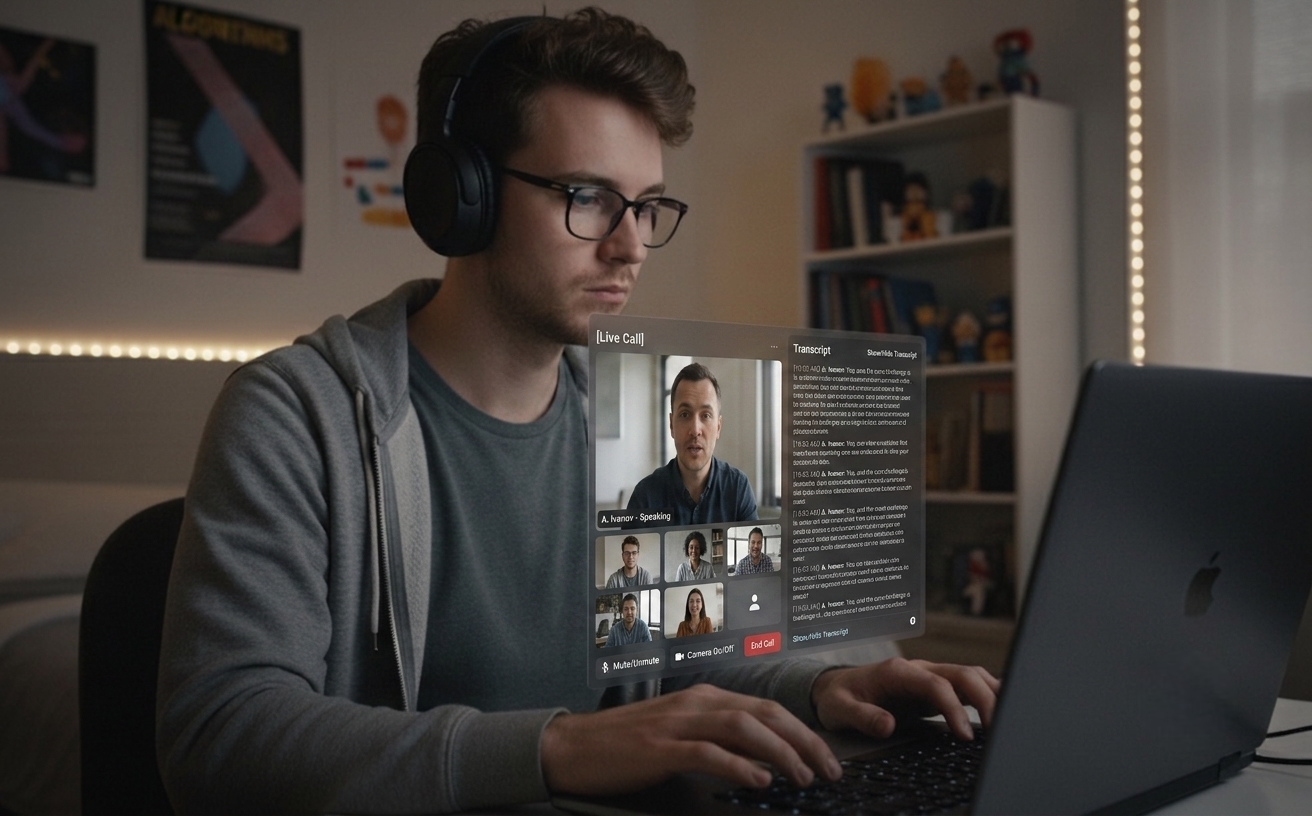
Live Audio Sessions transcribe the other side of the call and generate answers when they pause — personalized with your resume and the role's JD. Toggle quiet transcription mode (⌘⇧L) for meetings where you just want a transcript, no AI suggestions. Your own audio stays private — never captured in production builds.
WORKS WITH ALL MAJOR PLATFORMSLive Session ActiveAI Answer Ready
Live Audio Sessions (Pro)
Resume + JD Personalization
Quiet Transcription Mode
Local Session History
16 Input + 16 Response Languages
Features
Built for live calls and the prep behind them.
From a quick screenshot during prep to a live answer mid-call — the same desktop tool fits interviews, meetings, and the work around both.
01
Pro Flagship
Live Audio Sessions
Hear the question, get the answer
Press ⌘L to start a session that captures the other side's voice from your system audio. Their words appear as a live transcript on the panel. When they pause, Claude generates a concise spoken answer (3–5 sentences) — personalized with your resume and JD. Works for technical interviews, behavioral rounds, and any meeting where you want an AI alongside the conversation. Your own mic is never captured in production builds, so your side stays private.
02
Meeting Mode
Quiet Transcription (⌘⇧L)
Transcript-first, AI on demand
Toggle auto-trigger off (⌘⇧L) and Live Audio runs as a quiet transcription tool — full transcript on the panel, no AI replies firing on every pause. Press ⌘⇧⏎ to fire an answer only when you actually want one. Example: a 30-minute design review where the transcript runs the whole time and you only ping the AI twice — once for a trade-off summary, once to draft the follow-up.
03
Personalization
Resume + JD Aware Answers
Answers in your voice
Save your resume and the role's job description on the dashboard. Live Audio answers and screenshot analyses are grounded in your real experience and the role's required skills. Files are parsed in your browser — only the extracted text leaves your device.
04
Auto-Classified
Coding + General in One Mode
One shortcut, every question
No mode toggle. Claude inspects the screenshot and chooses the right shape — full algorithmic solution with complexity and code, or a direct paragraph answer for system design, math, and concept questions. Behavioral / "tell me about a time" prompts arrive structured in STAR format (Situation / Task / Action / Result) with one likely follow-up so you can pre-empt the next question.
05
Privacy
Local Session History
Searchable, exportable, on-device
Every Live Audio session is auto-saved on session end — full transcript, translations, and AI answers — as plain JSON in your app's userData directory. Local-only, never uploaded; data-at-rest is covered by your OS-level disk encryption (FileVault on macOS, BitLocker on Windows). Press ⌘⇧H to toggle the history window open or closed; the search box filters across every session's full body (transcripts, translations, AI suggestions) with matched-substring highlights. Export any session to Markdown or JSON for note-keeping.
06
Localization
Inline Translation + 16 Languages
Cross-language ready
The other side speaks English while you set Korean? An inline translation appears under their transcript line, only when the source language differs from your target. AI answers respond in your chosen language across English, Korean, Japanese, Chinese, Hindi, German, Spanish, French, Portuguese, Russian, Vietnamese, Thai, Indonesian, Arabic, Italian, and Dutch.
Keyboard
Keyboard-first workflow
Control everything with keyboard shortcuts. The whole app is keyboard-driven, so you don't have to break eye contact during a call.
Universal Shortcuts
Capture^S
Area Capture^⇧S
Analyze Screenshot^Return
Reset^O
Hide^H
Live Audio Session (Pro)^L
Auto-Trigger On / Off (in Live)^⇧L
Trigger Now (in Live)^⇧⏎
Close Live Panel^⇧W
Open Session History^⇧H
Sign Out^⇧O
Quit Application^Q
Navigation
Move Windows^↑↓←→
Adjust Opacity^[/]
Corner Positioning^1-4
Settings
Open Settings^P
Change Programming Language^⇧↑/↓
Change Response Language^⇧←/→
Change Input Language (Live Audio)^Alt+←/→
Pro
Ctrl+L
Live Audio Sessions (Pro Feature)
Continuously transcribes the other side's voice from your system audio — works for interviews and meetings alike. AI answers fire automatically when they pause; toggle that off with Ctrl+⇧L for quiet meetings. Press Ctrl+L to start or stop the session. Lock the spoken language with Ctrl+⌥←/→ — pinning it to one of 16 supported languages keeps heavy accents from flipping mid-session. Your own mic is not captured in production builds.
Pro-only. Local-only transcripts (plain JSON, never uploaded). macOS 13+ via ScreenCaptureKit, Windows 10+ via WASAPI loopback.
Plans
Simple pricing for everyone
Start free and scale as you succeed. No hidden fees, cancel anytime.
All plans include our core features. Upgrade or downgrade anytime.
Download
Get set up in minutes
Download Quiet Assistant — Live Audio Sessions for interviews and meetings, resume-personalized answers, and auto-classified screenshot analysis. Available for Windows & macOS.
Latest release · May 13, 2026 · Free to start
Latest: input language lock for Live ASR (16 languages, ⌘⌥←/→), 3s chunking for fast speakers, multi-monitor screenshot follows the focused window
01
macOS
macOS 13+ Universal
Live Audio Sessions via macOS ScreenCaptureKit. Resume + JD personalized answers.
02
Windows
Windows 10/11
Live Audio Sessions via Chromium WASAPI loopback. Resume + JD personalized answers.
After install
Try it out
Two flows, both under two minutes. Pick whichever matches what you'll actually use the app for.
01
Screenshot flow
Open any visible problem — a LeetCode page, a doc, a tweet — press ⌘S to capture, then ⌘Return to analyze.
If you run into any issue, let us know at hello@uhzlab.com. We'll get it fixed quickly so you can use it without problems when it matters most. Your feedback is always appreciated.
What is Quiet Assistant?
Quiet Assistant is an AI-powered live copilot for interviews and meetings. It transcribes the other side's voice from your system audio in real time and generates Claude-powered answers when they pause, personalized with the user's resume and the role's job description. For meetings where AI replies on every pause would be noisy, an auto-trigger toggle (⌘⇧L) turns it into a quiet transcription tool with answers fired only on demand (⌘⇧⏎). It also analyzes screenshots of any problem on screen, auto-classifying them as coding (full code + complexity) or general (direct paragraph answer). The user's own microphone is not captured in production builds, keeping their side of the conversation private.
Key Features:
Live Audio Sessions (⌘L, Pro) — continuous transcription of the other side's voice, auto-generated answers
Quiet transcription mode (⌘⇧L off) for meetings — transcript without continuous AI replies
Trigger Now (⌘⇧⏎) — fire an AI answer manually only when wanted
Resume + JD personalized answers grounded in the user's real experience
Behavioral / "tell me about a time" answers structured in STAR format (Situation / Task / Action / Result) with a likely follow-up question
Local Session History (⌘⇧H toggle) — plain JSON on your device, never uploaded; full-text search across past sessions, export to Markdown or JSON
Auto-classified screenshot analysis — coding vs. general, no mode toggle
Multi-monitor screenshot — both ⌘S and ⌘⇧S follow the focused window's display, so the overlay always lands on the screen you're looking at
Input language lock for live ASR (⌘⌥←/→) — pin one of 16 supported languages so heavy accents don't flip mid-session; response language cycles independently with ⌘⇧←/→
Inline speaker-side translation across 16 languages, fired only when the input language differs from the response language
Production builds don't capture the user's mic — only the other side is transcribed
Multi-platform: macOS 13+ via ScreenCaptureKit, Windows 10+ via Chromium WASAPI loopback
How does Quiet Assistant work?
Quiet Assistant supports two complementary workflows in a single desktop app:
Live Audio workflow (interviews and meetings):
Press ⌘L (Pro) to start a Live Audio Session
The app captures the other side's voice from your system audio and shows a live transcript on the panel
For interviews: when they pause, Claude generates a 3–5 sentence answer using your saved resume and JD
For meetings: toggle auto-trigger off (⌘⇧L) — the panel becomes a quiet transcript tool; press ⌘⇧⏎ to fire an answer only when you actually want one
On session end, the full transcript and answers are auto-saved as plain JSON in your app's userData directory — never uploaded; open with ⌘⇧H
Your own microphone is not captured in production builds, so what you say never leaves your room
Screenshot workflow (visible problems):
Press ⌘S (full screen) or ⌘⇧S (area selection) to capture the problem — the capture follows your focused window's monitor on multi-display setups
Press ⌘Return to analyze — Claude auto-classifies the screenshot
Coding problems get full code, complexity analysis, and follow-up Q&A
General questions (system design, math, concept) get a direct paragraph answer with key points
Behavioral / "tell me about a time" prompts arrive in STAR format (Situation / Task / Action / Result) on separate lines, plus one likely follow-up question
Can I use Quiet Assistant during meetings?
Yes. Press ⌘L to start a Live Audio Session, then toggle auto-trigger off with ⌘⇧L. The transcript runs continuously on the side panel without firing AI replies on every pause. Press ⌘⇧⏎ ("Trigger Now") any time you want an AI answer on the recent transcript. Designed for stand-ups, design reviews, sales calls, customer interviews, and any meeting where you want a transcript and an occasional assist rather than continuous AI suggestions. The transcript is stored locally as plain JSON in your app's userData directory (⌘⇧H to review) — never uploaded; FileVault / BitLocker covers data-at-rest. Your own mic is never captured in production builds.
Quiet Assistant vs Other Interview Assistants
Quiet Assistant combines the live-audio answering of LockedIn AI / Final Round AI / InterviewCopilot.io with resume + JD personalization (a Beyz AI pattern), plus a quiet-transcription mode that makes it usable for ordinary meetings — not just interviews.
Differentiators:
Works for both interviews (continuous AI replies) and meetings (quiet transcription, AI on demand)
Live Audio Sessions on both macOS (ScreenCaptureKit) and Windows (Chromium WASAPI loopback)
Resume + JD personalization shared between Live Audio answers and screenshot analysis
Local-only session history with full-text search and Markdown / JSON export — plain JSON on your device, never uploaded
Input language lock for live ASR (16 languages) — pin one to keep heavy accents from flipping mid-session
Inline speaker-side translation that only fires when the input language differs from the response language
Flexible pricing: $10/week, $30/month, or $180/year ($15/month billed annually)
Single desktop app — no browser extension required
Powered by Claude Sonnet 4.5 with Haiku for translation and lightweight tasks
Quiet Assistant Pricing
Quiet Assistant offers both free and paid plans:
Free Plan:
Auto-classified screenshot analysis with blurred results
Test the complete workflow before subscribing
No Live Audio Sessions on the free tier
Pro Plans:
$10/week — fits short interview loops
$30/month — standard monthly billing
$180/year — works out to $15/month billed annually
3-day free trial on every Pro plan
Live Audio Sessions for interviews and meetings, resume + JD personalization, quiet-transcription mode, local session history, inline translation
16 input + 16 response languages
Unmetered usage within the plan
Email support
How to Install Quiet Assistant
Installing Quiet Assistant is simple and takes less than 2 minutes:
Installation Steps:
Download the installer from quietassistant.io
Run the installer (no administrator rights needed)
Complete the one-time Google authentication
Grant Screen Recording permission so the app can capture system audio (the other side's voice) for Live Audio Sessions
Save your resume and JD on the dashboard for personalized answers
Press ⌘L to start a Live Audio Session, or ⌘S to capture a screenshot
System Requirements:
macOS 13+ (Ventura) for Live Audio Sessions; macOS 10.15+ for the screenshot workflow only
Windows 10/11 for full Live Audio Sessions
4GB RAM minimum
Internet connection
500MB free disk space
Best AI Interview and Meeting Copilot 2026
Quiet Assistant is widely picked as a leading AI live-audio copilot in 2026 because it combines live answering for interviews, quiet transcription for meetings, resume-personalized responses — all in a single desktop app.
Why people pick Quiet Assistant in 2026:
Live Audio Sessions answer interviewer questions automatically — works on macOS and Windows
Quiet transcription mode (⌘⇧L off) makes the same tool usable for stand-ups, design reviews, and sales calls
Answers grounded in the user's real resume and the role's job description
Local-only session history (plain JSON) — never uploaded
Inline translation only when the other side's language differs from the user's target
Flexible pricing: $10/week, $30/month, or $180/year for short or long usage
Screenshot workflow works alongside HackerRank, CodeSignal, CoderPad, LeetCode OA, and any browser-based platform
What AI model does Quiet Assistant use?
Quiet Assistant is powered primarily by Claude Sonnet 4.5 (Anthropic) for answer generation in both Live Audio Sessions and screenshot analysis. Claude Haiku 4.5 handles lightweight inline translation. Audio transcription uses OpenAI's gpt-4o-transcribe (chunked streaming, sub-second latency). Claude is known for superior reasoning and code generation — ideal for technical interview answers under time pressure.
Quiet Assistant pricing and plans 2026
Quiet Assistant offers a free trial and three Pro tiers: $10 for a week, $30 for a month, or $180 for a year (works out to $15/month when billed annually). All Pro plans include Live Audio Sessions for interviews and meetings, resume + JD personalization, quiet-transcription mode, local session history (plain JSON, never uploaded), inline speaker translation, 16 input + 16 response languages, and unlimited usage.
How to prepare for Meta's AI-enabled coding interview?
Meta's AI-enabled coding interview (introduced in 2025) allows candidates to use AI tools like Claude Sonnet and GPT-4o during a 60-minute coding session in CoderPad. To prepare: practice using AI tools to solve algorithmic problems, learn to verify and explain AI-generated solutions, work on multi-file project structures, and practice time management across problem exploration, design, implementation, and optimization phases. Quiet Assistant's auto-classified screenshot analysis and Live Audio Sessions are ideal for simulating this format — capture the CoderPad problem with ⌘S for code generation, then use ⌘L during the design discussion.
What are Live Audio Sessions in Quiet Assistant?
Live Audio Sessions are Quiet Assistant's flagship Pro feature for live conversations — interviews, behavioral rounds, and meetings. Pressing ⌘L starts continuous capture of the other side's voice via system audio (ScreenCaptureKit on macOS 13+, Chromium WASAPI loopback on Windows 10+). The transcript is shown live on the side panel. When they pause, Claude Sonnet 4.5 generates a concise spoken answer (3–5 sentences) personalized with the user's saved resume and the target job description. Behavioral / "tell me about a time" prompts arrive structured in STAR format (Situation / Task / Action / Result) with one likely follow-up. Auxiliary shortcuts: ⌘⇧L toggles auto-trigger on or off (turn it off for quiet meetings), ⌘⇧⏎ ("Trigger Now") fires an answer on demand, ⌘⇧W closes the panel, ⌘⇧H toggles the local session history window (with full-text search across all past sessions and Markdown / JSON export), ⌘⌥←/→ cycles the input language to lock the spoken language onto one of 16 supported languages (so heavy accents don't flip mid-session), and ⌘⇧←/→ cycles the AI's response language separately. The user's own microphone is not captured in production builds. Transcripts of the other side's voice are stored locally as plain JSON in the OS's standard application-data directory (`~/Library/Application Support/interview-assistant/sessions/` on macOS, `%APPDATA%\interview-assistant\sessions\` on Windows) — never uploaded; data-at-rest is covered by your OS-level disk encryption (FileVault / BitLocker).
How does Quiet Assistant handle behavioral interview questions?
When Claude Sonnet 4.5 classifies a screenshot or live-audio question as behavioral / situational ("tell me about a time when...", "describe a conflict you...", "how did you handle..."), the answer arrives structured in STAR format on separate lines: Situation: the context, Task: the candidate's responsibility, Action: what they did, Result: the outcome. The whole STAR block stays around 5–7 sentences so it's scannable mid-interview rather than a wall of prose. Below the answer, a Follow-up: field carries one likely next question so the candidate can pre-empt it. The personalization layer pulls from the user's saved resume, so the Situation and Action draw on real experience rather than generic templates.
Can I search and export Live Audio session history?
Yes. Press ⌘⇧H to toggle the Session History window — a second press closes it. The search bar above the session list filters across every session's full event body (interviewer transcripts, your own transcripts when present, inline translations, AI suggestions) and surfaces a small italic snippet with the matched substring highlighted. Typing debounces at 200ms; ESC clears the query first, then closes the window. Each session detail has Export Markdown / Export JSON buttons next to Delete: Markdown is human-readable with timestamps, role headings, and translations as block-quotes; JSON is the raw session record for piping into your own tooling. Sessions live as plain JSON in the app's userData directory — exports go through the OS file dialog and write to disk only; nothing is uploaded.